
iOS 27: Every New Feature Coming to Your iPhone by Category
Discover everything new in iOS 27. From the new Siri and Apple Intelligence upgrades to Liquid Glass, redesigned apps, hidden features and all the biggest changes coming to your iPhone.
IOS 27
6/14/20267 min read
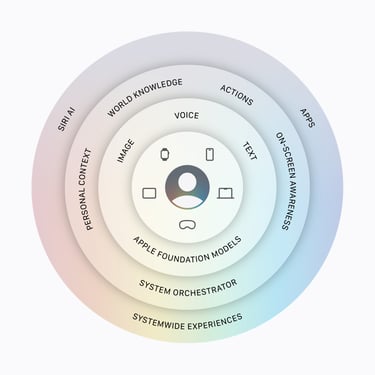
iOS 27 Features: Everything New Coming to Your iPhone.
Apple has packed iOS 27 with a lot of new features, small refinements and quality-of-life improvements. Some changes are instantly visible, while others are hidden deeper inside your favorite apps. I’ve also written a full blog article covering all the new visual changes, including examples and how-to guides. You can read it here.
In this article I’ve grouped all the new iOS 27 features by category, so you can easily discover everything that’s new.
Design & System Experience
iOS 27 continues improving the overall iPhone experience with more customization, smoother animations and small details that make everything feel more polished. To my personal experience is that iOS 27 feels very fast!! This is everything new:
Updated Liquid Glass design refinements
New system-wide Liquid Glass controls
Improved animations across iOS
Better overall performance and responsiveness
Improved power efficiency across the system
Siri & Apple Intelligence
Apple Intelligence continues to become more deeply integrated into iOS 27, making your iPhone smarter and way more personal. This is new & improved:
New Siri experience
Improved Apple Intelligence features
Better on-device intelligence
More natural interactions
Smarter system integration
Camera
The Camera app gets improvements focused on speed, usability and video performance and it adds new features.
Redesigned Camera experience with easier-to-reach controls
All Camera options are now displayed in Settings
Camera uses less power in Low Power Mode
Faster Camera launch while using Low Power Mode
Smoother camera switching when zooming during video
Photos
The Photos app receives one of the biggest updates with smarter search, better organization and improved shared albums.
Add keywords to photos and videos
Add star ratings to your photos
Improved search results for people and pets
Search using additional photo and video metadata
Create customized slideshows
Save slideshows as videos
Save a video frame as a photo
New “Captured by Me” collection
Identity Documents collection
Better photo orientation detection
Faster loading of recent captures
Faster rendering of collections
Improved Photos widget performance
Choose specific pets in Photo Shuffle
Option to include yourself in Photo Shuffle
Prioritize syncing with iCloud Photos
iCloud Shared Albums
Sharing memories with friends and family gets a lot better in iOS 27. This is what is new & improved
Share full-resolution photos and videos
Filter photos and videos inside Shared Albums
View recent Shared Album activity
React with any emoji
Improved participant permissions
Expiring Shared Albums
Easier invitations
Easier saving from Shared Albums
Join Shared Albums from Android and Windows
Messages
Messages gets smarter, faster and more reliable. And it has some exciting new features. Here is everything new.
New drawing experience inside Messages
Improved syncing between Apple devices
Failed messages automatically retry sending
Better handling when sending multiple photos and videos
Find offloaded media
Preview thumbnails for offloaded content
Search conversations by phone number or nickname
Better Tapback notification grouping
Faster access to recent Camera captures
FaceTime
FaceTime gets better quality and more creative options.
Dual camera caputure support. It's expected to be introduced in ios 27 final release and currently not working in the first beta.
Improved video quality on slower connections
Safari
Safari becomes faster, smoother and more power efficient.
Faster Start Page loading
Improved web app performance
Smoother animations and graphics
Faster JavaScript performance
Smoother Start Page resizing
Improved battery efficiency
Web audio no longer interrupts system audio
Mail receives several improvements focused on speed and reliability.
Improved Top Results in search
Faster email loading
More reliable search indexing
Improved list formatting
More accurate unread badges
Notes
Notes becomes more powerful for organizing your ideas.
Copy and paste as Markdown
Add section links
New divider lines
Drawing support on Mac
Calendar
Managing your schedule gets easier.
Edit multiple Calendar events
Smoother scrolling
Cleaner event details
Improved third-party Calendar notes
Shortcuts
Shortcuts gets one of its biggest updates for automation fans.
Redesigned Shortcuts editor
Expanded “Get What’s On Screen” actions
Else If support
Store data directly in Shortcuts
Group conversation support
Screenshot automations
Notification automations
Apple Maps
Maps gets smarter with better navigation and discovery.
More accurate Visited Places
Improved Flyover experience
Better Offline Maps updates
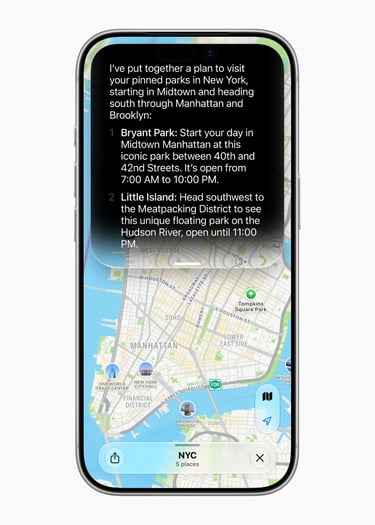
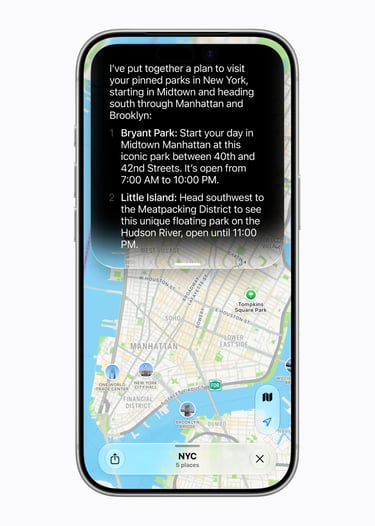
Natural language search for routes
Home
The Home app gets better support for smart homes.
View multiple camera streams at once
4K camera recording support to supported camera's.
More reliable HomeKit camera storage
Faster accessory pairing
Faster smart home updates
Improved Thread accessory connections
Apple Music
Music gets smoother with new listening experiences.
New AutoMix transitions
Refreshed album pages
Updated artist pages
Faster Now Playing loading
Faster playback start
Improved streaming reliability
Podcasts
Podcasts gets some useful upgrades.
Search inside shows
Improved video podcast experience
Redesigned Podcasts app on tvOS
Find My
Finding your devices and friends becomes even better.
Precision Finding Live Activity support
More flexible sharing options
Updated Find My interface
Freeform
Freeform gets more powerful for creativity and collaboration. Freeform is part of Apple Creator Studio which was launced January '26.
Faster board previews
Better board performance
Improved text editing
Dark Mode adaptive canvas
Collaborative folders
Drawing support on Mac
Health & Fitness
Health and Fitness receive more personal insights and tracking improvements.
Perimenopause and menopause symptom logging
New educational Health content
Fitness+ workouts for different life stages
Faster Health data updates
Synced step count between Health and Fitness
More accurate workout route maps
Improved treadmill distance accuracy
GymKit support improvements
Better Sleep tracking when changing time zones
Journal
Journal becomes better for saving memories. And it's actually the app that has become more powerful over the years.
Improved journaling streaks
iCloud sync status for entries
Increased attachment limits
Time stamps for entries
Weather
The Weather app gets a cleaner experience.
Updated hourly forecast view with conditions, precipitation and wind.
Improved 10-day forecast view
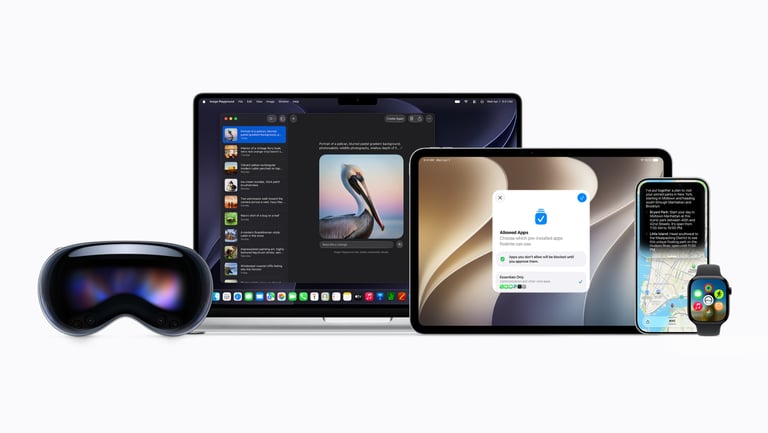
Apple didn’t only introduce iOS 27 this year. The full ecosystem is getting a fresh update too, with macOS Golden Gate, iPadOS 27, watchOS 27, tvOS 27, visionOS 27 and new CarPlay improvements.
All platforms are getting smoother animations and faster window switching to smarter widgets, better Control Center updates. Also CarPlay is now more reliable. And there is even more to explore. Here are all the details and new features coming to the other Apple OS versions.

iPadOS 27
iPadOS 27 makes the iPad feel more flexible and closer to a desktop experience, while still keeping the simplicity of iPad.
Keep the menu bar visible when you want faster access
Make iPhone apps fit better on the iPad screen
See app names directly in the status bar
Move through files and transfers more quickly
Open the menu bar with less delay
Switch between windows faster
Close windows more smoothly
Undo or redo changes you make to your Home Screen
Add extra-large widgets to Today View
macOS Golden Gate
macOS Golden Gate brings more polish to the Mac, with smoother animations, cleaner sidebars and better support for external displays.
Use more touch controls when working with Sidecar
Set up new user accounts faster
Enjoy cleaner sidebars that stretch from edge to edge
Spot sidebar sections more easily with colorful icons
Get refreshed icons in the menu bar
Pull down to refresh in supported places
See more clearly which window is active
Move through Mission Control and Spaces with smoother animations
Let columns resize automatically or reset them when needed
Use more high-resolution and high-refresh-rate options with external displays
Keep windows in the right place more consistently on external screens
Enjoy more consistent rounded corners across macOS
See HDR support in parts of the macOS system interface
Check Ethernet status straight from the menu bar
Open Control Center while using iPhone Mirroring
Watch protected video content through iPhone Mirroring
Mirror your Mac in up to 5K resolution
watchOS 27
watchOS 27 focuses on speed, smarter suggestions and a more refined Apple Watch experience throughout the day.
Navigate apps with a more dynamic app grid
Use a new tap gesture for easier control
Find people, devices and items in one combined Find My app
Manage Apple Watch settings in a cleaner redesigned app
Get smarter suggestions in the Smart Stack
See your parked car from Maps in the Smart Stack
Access transit cards and IDs more easily from the Smart Stack
Use Guest Key support from your wrist
Check your Wallet card balance on Apple Watch
Track steps with better accuracy
Start media playback faster
Get better battery performance
Stay connected with improved Wi-Fi
Launch app extensions more quickly
Benefit from smarter water detection
tvOS 27
tvOS 27 makes Apple TV feel smoother, faster and easier to use from the couch.
tvOS 27 is all about making Apple TV feel faster, smoother and easier to read from the couch.
Let Apple TV handle smart downloads more automatically
View AppleCare coverage details in Settings
Open and use Control Center more quickly
Choose larger text sizes for better readability
Enjoy smoother animations and faster app launches
visionOS 27
visionOS 27 makes Apple Vision Pro feel more personal, more spatial and more refined.
Turn your own panoramas into immersive Environments
Place even smaller widgets in your space
Use a more refined Control Center
Look at notifications and tap to respond
View panoramas with spatial scene support
Add a Mac Virtual Display widget
Open windows with a more curved, spatial design
Use multiple tab views in Safari
Start up and connect to Wi-Fi faster
CarPlay
CarPlay also gets a few useful upgrades that make media and navigation feel more reliable on the road.
Scrub through audio from Now Playing
Use a new compact MiniPlayer for audio
Get better navigation heading and GPS accuracy
Connect more reliably with wireless CarPlay
Final Thoughts
iOS 27 is definitely the star of the show this year, especially with the new Siri, Apple Intelligence and all the visual changes across the system. But what I really like is how Apple keeps improving the complete ecosystem.
From your iPhone and iPad to your Mac, Apple Watch, Apple TV and Vision Pro. Everything feels more connected, faster and more refined. This is every year my experience, but this year it really feels faster! You can feel that the focus is on speed and AI.
The first developer beta already feels surprisingly good, but I have a feeling that this is just the beginning. Apple will continue improving iOS 27 and all the other updates before the official release later this year in September. There are 6 or 7 beta's expected until the final followed by an RC release.
I’ll keep testing all the new features and sharing my favorite discoveries with you. I will use mostly my Threads channel for this.
What is your favorite new Apple feature this year? Please let me know
Follow me on my socials
If you enjoy my content, you can also follow me on my Threads page. I post daily Apple insights, aesthetic photos, iOS tips, and the latest Apple news there. I’d really appreciate your support and would love to see you there. Scan the below QR code to go to my profile.