Your weekly dose of Apple news, iOS guides & more → Subscribe FREE

Apple Intelligence in iOS 27: The New Siri AI Changes Everything
I’ve been testing Apple Intelligence in iOS 27, and Siri feels completely different. Here’s everything new with Siri AI and Apple’s latest AI features.
APPLE INTELLIGENCE
6/15/202613 min read
I've been running the iOS 27 developer beta for a couple of days now, and I want to be honest with you: I almost didn't write this article because I was afraid it would sound like hype. But after spending real time with it, asking Siri things I'd never bothered asking before, watching it actually work, I felt like I had to.
Siri finally feels like the AI assistant Apple always wanted to build.
That might sound like something you've heard before. Apple has been promising a smarter Siri for years. We got incremental updates, occasional improvements, and a lot of "hey, that's pretty cool" moments followed quickly by "wait, never mind, it misunderstood me." But iOS 27 is different. This isn't an update to Siri. Apple literally rebuilt it from scratch, gave it a new name — Siri AI — and embedded it so deep into the iPhone experience that it now feels less like a feature and more like a layer of intelligence that lives everywhere. You can read more here.
Let me take you through everything I've found so far, from the big picture to the features most people are going to completely miss.
What Is Apple Intelligence?
Before we get into Siri specifically, it helps to understand the foundation everything is built on.
Apple Intelligence is Apple's personal AI system. It is the engine that powers smart features across iOS, iPadOS, macOS, watchOS, and visionOS. Think of it less as a single feature and more as a platform that makes every Apple app and experience smarter.
Apple Intelligence combines two things: AI models that run entirely on your device (so your data never leaves your iPhone), and more complex tasks handled through Private Cloud Compute (PCC) This is Apple's own secure servers that process data without storing it or making it accessible to anyone, including Apple itself.
For iOS 27, Apple has taken that foundation to the next level. They've partnered with Google to integrate Gemini-based models at the foundation layer for the more powerful cloud processing, while Apple's own on-device models handle the personal, private stuff locally. It's a clever architecture, and the privacy story is genuinely impressive. More on that later.
The point is: Apple Intelligence isn't just a chatbot tucked into a button. It's the intelligence layer woven into your entire iPhone. And in iOS 27, that layer just got dramatically more capable.
The Biggest Siri Upgrade Ever. And That's Not an Exaggeration
Let me be direct: what Apple shipped in iOS 27 is not a Siri upgrade. It's a Siri replacement and it is using it's own app called Siri AI.
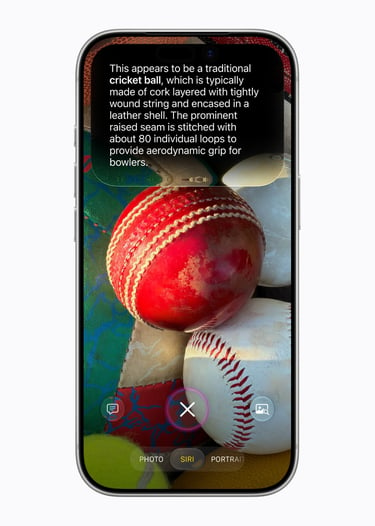
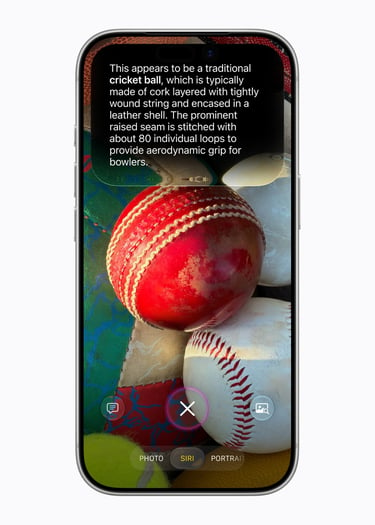
The new version is called Siri AI, and it performs more like ChatGPT or Claude than anything Apple has shipped before. Full back-and-forth conversations. Web search built in. It knows your personal data across all your apps. It can see what's on your screen. It can take action across apps on your behalf.
To appreciate how big this is, here's a quick comparison of old Siri versus what we have now:
Old Siri:
Single commands only, no context carried between them
No memory of previous conversations, ever
Could barely search your own emails or messages reliably
Couldn't search the web. It would just open Safari and leave you to it
Zero awareness of what was on your screen
No cross-app intelligence
New Siri AI:
Full multi-turn conversations with context that carries through
Persistent history that syncs across all your Apple devices
Deep access to Mail, Messages, Photos, Notes, Calendar, Reminders, and third-party apps
Generates real answers from the web. No redirect needed
Reads and acts on whatever is currently on your screen
Can draft emails, edit photo albums, add events, split bills. Across apps, in one request
One thing I immediately noticed is how different it feels to just talk to it. There's no more of that anxious uncertainty of "will Siri understand this or will I have to rephrase it three times?" You ask something the way you'd ask a person, and it answers the way a person would.
New Siri Design — It Lives Everywhere Now
The design changes are just as important as the intelligence upgrades. Apple didn't just make Siri smarter. They rethought where Siri lives on your device.
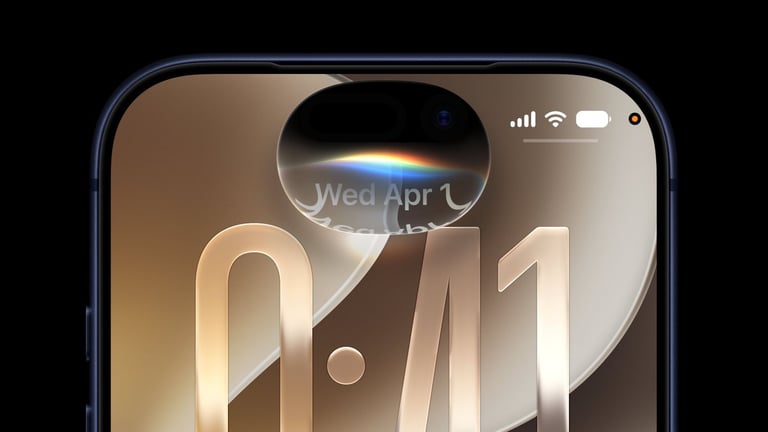
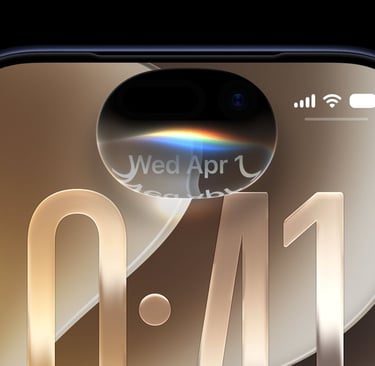
The Dynamic Island is now Siri's home. Swipe down from the center of the Dynamic Island and you get the new Search or Ask interface. This interface has completely replaced Spotlight Search. It's beautiful, fast, and it knows the difference between "I'm looking for a file" and "I want to ask a question." Concise answers appear right there in the Dynamic Island area; swipe down for more depth or to keep the conversation going.
There's a dedicated Siri app. This is a first. For the first time in Siri's history, there's a standalone app where your conversation history lives. Every chat is saved and synced across all your devices via iCloud. I started a research conversation on my Mac in the morning, picked it up on my iPhone on the commute, and continued it on my Apple Watch at lunch. That kind of continuity has simply never existed in the Apple ecosystem before.
Siri is woven into context menus. On Mac, right-click anything. An image, a PDF, selected text, and "Ask Siri" appears as an option. It's so naturally integrated that I've started using it constantly without thinking about it. On Vision Pro, Siri shows up as a 3D visualization you can place anywhere in your space and activate just by looking at it.
After testing it for a few days, I genuinely don't miss the old Spotlight Search. The new interface is faster, smarter, and actually answers questions instead of showing you a list of links.
Siri + ChatGPT — What Apple Is (and Isn't) Telling You
This is where it gets interesting, and a little complicated.
At WWDC 2026, Apple did not officially announce deeper ChatGPT or Gemini integration or third-party AI model switching. But what they didn't announce is almost as interesting as what they did.
Reporters at Bloomberg have confirmed that Apple has built an internal framework inside iOS 27 called Extensions. This is a system that would let users choose their preferred third-party AI model inside Siri. The iOS 27 developer beta already contains backend controls for enabling and disabling this functionality, along with what looks like a new App Store section designed to support compatible AI apps. Apple has reportedly held discussions with OpenAI, Anthropic (the company behind Claude), and Google about plugging their models into this system.
So why wasn't it announced at WWDC? Best guess: Apple didn't want to overshadow their own Siri launch, they're managing the existing ChatGPT arrangement carefully, and the EU regulatory situation makes any new AI deals complicated to announce publicly right now.
What this means for you: The existing ChatGPT integration that Apple introduced in iOS 18 continues. And it's very likely that true AI model switching, where you choose between ChatGPT, Claude, or Gemini inside Siri, is coming in a future iOS 27.x update. The groundwork is already in the code.
For now, the foundation models powering Siri AI are built with Google Gemini at the server layer, combined with Apple's own on-device models. The result is a Siri that can genuinely compete with standalone AI assistants. Without you ever needing to leave the Apple ecosystem to get there.
How Siri Understands Your Personal Context
This might be the feature that impresses me most, and it's one that's harder to demo than it is to experience.
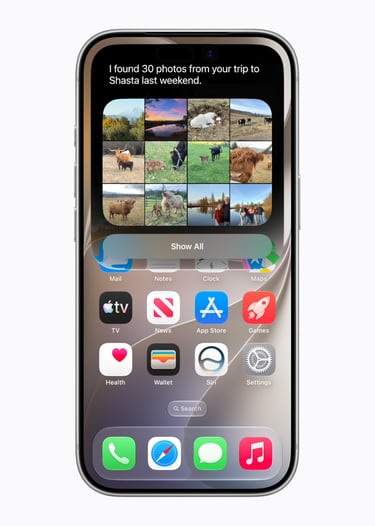
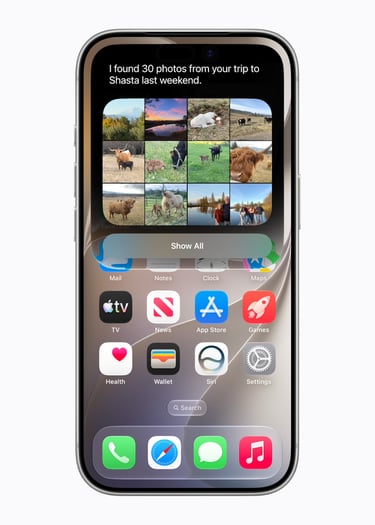
Siri AI has what Apple calls personal context understanding. This means it has now the ability to search across your Mail, Messages, Photos, Notes, Reminders, Calendar, and third-party apps to find and surface information that's relevant to you, in the moment.
Apple rebuilt the Spotlight search index from scratch. Content is indexed faster and returns more relevant results, especially in Mail. And crucially, this all happens on-device through the Spotlight index. Your data doesn't get sent anywhere.
One thing I immediately noticed is how this changes the kinds of questions you feel comfortable asking Siri. I found myself asking things I would have never bothered trying before:
"Find the confirmation email for my hotel in Bali"
"Is it safe to be on the scooter with 2 adults and 2 children?"
"Show me photos from my trip to Sidemen in Bali in February"
And it just... works. Every time. The old Siri would have struggled with any of those. The new one nails them, instantly, because it's searching the actual content of your emails and messages — not just guessing from a keyword.
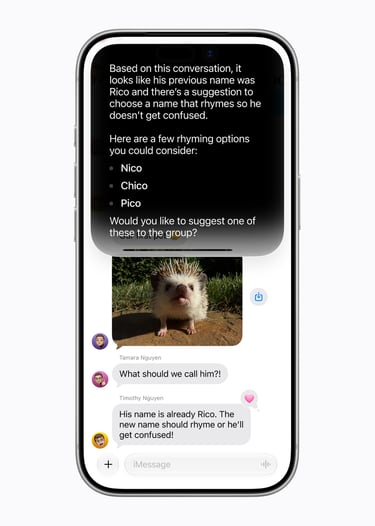
The personal context also extends into onscreen awareness. Siri can read what's currently on your display and act on it. Get a text about a potluck? Siri sees the message, you ask "what should I bring?", it brainstorms options, and adds a recipe to Notes. You never copy a single thing. You never switch apps manually. It just flows.
Everyday Examples — What This Actually Looks Like in Real Life
I know features sound great in bullet points, but let me paint a picture of what a day with iOS 27 actually looks like and how I used the new Siri.
7:30am. I ask Siri "What's on my calendar today and anything urgent in email?" One spoken summary. Done. I'm out the door without unlocking my phone three times.
9:00am. I need to call my insurance company for a new car. Before I even say hello, iOS 27's new Call Context feature reads my insurance info from Mail and puts my policy number on screen automatically.
12:30pm. Lunch with four colleagues. I photograph the receipt in Siri Camera mode and say "split this four ways and send Apple Cash requests to the group chat." Done in 20 seconds.
1:00pm. I'm reviewing a complex supplier contract in Mail. I highlight a dense paragraph, right-click, tap "Ask Siri" — "Explain this clause in plain English." Instantly clear.
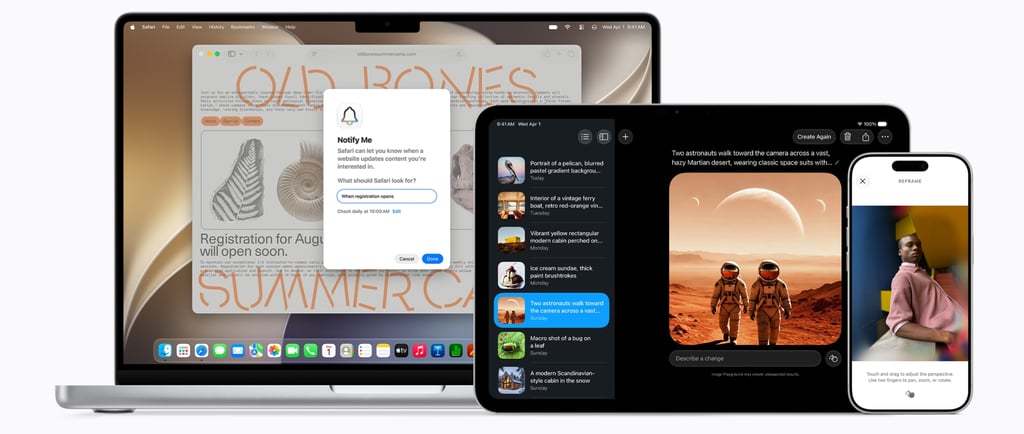
2:00pm. I'm browsing Safari and want to monitor a competitor's pricing page for changes. I tap "Notify Me" and tell Safari exactly what I want to be alerted about. Safari watches the page for me. No third-party app, no bookmarking service.
5:30pm. Back home. I took a photo during the day that accidentally cut off half the subject. I use the new Extend tool in Photos — it generates the missing parts of the image using AI. It looks completely natural.
8:00pm. I sit down with the Siri app to continue researching a travel plan I started on my Mac this morning. The full conversation history is right there. I pick up exactly where I left off.
That's not a curated demo. That's a Tuesday.
Privacy and On-Device AI — Apple's Real Advantage
I want to spend a moment on this because it's genuinely Apple's biggest differentiator in the AI space, and it doesn't get talked about enough.
When you use Siri AI to search your personal data. Your emails, messages, photos, notes. It all happens on your device. The Spotlight index that powers Siri's personal context understanding never leaves your iPhone. Apple, Google, and no one else sees it.
When a task is complex enough to need cloud processing, it goes to Private Cloud Compute (PCC) — Apple's dedicated AI servers. Here's what makes this different from every other AI company's approach:
Your data is processed but never stored
It is not accessible to Apple or anyone else
Independent security researchers can verify this at any time. Apple has committed to ongoing third-party audits
The Gemini integration sits within this PCC architecture. Requests are handled at the model level, They're not fed into Google's consumer data pipeline or used to train anything. Apple confirmed this explicitly.
Is it perfect? No privacy solution ever is. But compared to sending your most personal questions to a general-purpose AI service with its own data retention policies, this is a meaningfully better approach. If privacy is a reason you've been hesitant about AI features, iOS 27 is worth reconsidering.
Which iPhones Support It. Don't Skip This Section
This is more complicated than usual, so pay attention. There are three tiers:
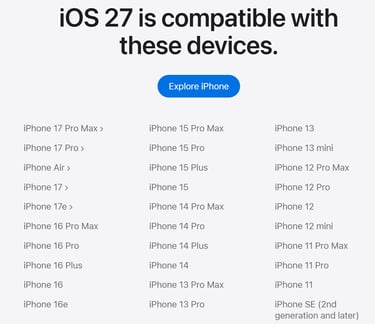
Tier 1 — iOS 27 (General): Any iPhone 11 or later, including iPhone SE 2nd generation and later. Everyone gets the core OS update, performance improvements, new design, parental controls, and all the non-AI features.
Tier 2 — Apple Intelligence & Siri AI: You need an iPhone 15 Pro, iPhone 15 Pro Max, or any iPhone 16 model or later (including iPhone 16 & 17e). This is where Siri AI lives. Personal context, web search, onscreen awareness, Visual Intelligence, Writing Tools, all of it.
Tier 3 — Advanced On-Device Model (the best stuff): iPhone Air, iPhone 17 Pro, and iPhone 17 Pro Max only. These devices have Apple's most powerful on-device chip with 12GB of RAM, which enables:
Expressive, customizable Siri voices (adjustable pace and personality)
Dramatically enhanced dictation with AI-powered formatting
One thing I want to flag for anyone considering the standard iPhone 17: it has 8GB of RAM, not 12GB, which means it misses both the expressive voice and the enhanced dictation. Not a dealbreaker, but worth knowing before you buy.
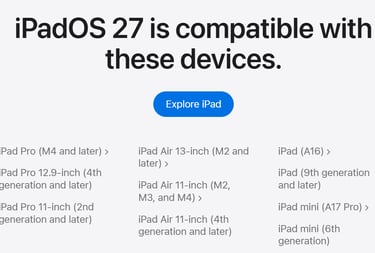
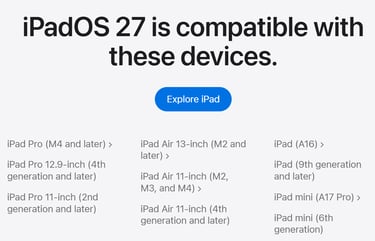
For iPad: iPad mini (A17 Pro) or later, iPad with M1 or later.
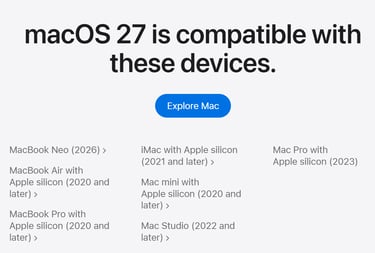
For Mac: M1 or later. Advanced features require M3+ with at least 12GB unified memory.
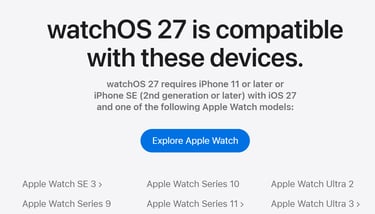
For Apple Watch: Series 10, Ultra 2, or SE 3 (when paired with an Apple Intelligence iPhone).
Availability — Who Gets It and When
Launch timeline:
Developer beta 1: Available now (June 2026)
Public beta 1: July 2026
General release: September 2026, alongside new iPhones
Language support at launch: Siri AI launches in English first, with rapid expansion planned to the full list of Apple Intelligence languages: Danish, Dutch, French, German, Italian, Norwegian, Portuguese, Spanish, Swedish, Turkish, Vietnamese, Japanese, Korean, and Chinese (Simplified and Traditional).
Regional availability. The important bits:
The EU situation deserves its own paragraph. Because of the Digital Markets Act (DMA), Siri AI will not be available on iPhone and iPad in the European Union at launch. This is the same regulatory battle that delayed other Apple Intelligence features in the EU previously. Mac, Apple Watch, and Vision Pro users in the EU will get Siri AI. Apple says they're "working hard to find a path forward" for iPhone and iPad — but there's no timeline.
China gets none of the Apple Intelligence features while Apple navigates regulatory requirements there.
If you're in the US or most other countries, you're getting the full experience from day one.
The Hidden Features Most People Will Miss
Because I can't resist: Here are some of the features buried in iOS 27 that I don't think will get nearly enough attention:
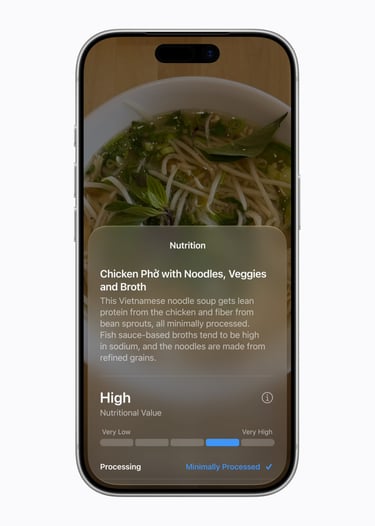
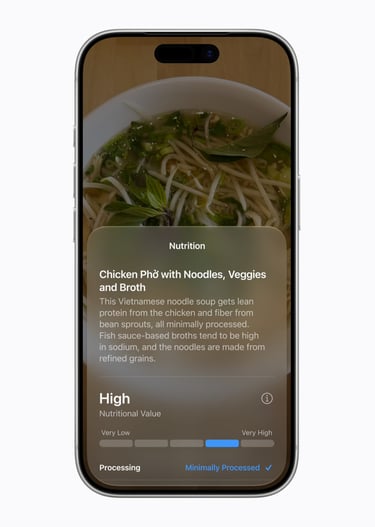
Nutritional scanning in the Camera. Point your camera at food in Siri mode and get nutritional insights. Protein content, processing level, sugar estimate. I use this at restaurants constantly now.
Safari "Notify Me." Set a webpage watch directly in Safari. Tell it exactly what change you want to be alerted about. Think of price drop, product back in stock, new article from a specific author. No third-party app needed.
Safari custom extensions from natural language. Describe what you want a Safari extension to do, and Safari AI builds it for you. "Remove all cookie consent banners" is now a two-second setup.
Membership card scanning. Photograph any loyalty or membership card and it imports directly into Wallet. I've already cleared out a wallet full of physical cards.
Business card to contact. Same idea. Snap a business card, the contact is imported instantly. Genuinely useful at conferences.
File naming suggestions. When you save any file or folder, iOS reads the content and suggests an appropriate name. Sounds small. Saves a surprising amount of time.
FaceTime Dual Capture. Stream your front and rear cameras simultaneously in FaceTime. Great for showing something while the other person can also see your reaction. Note: this option is not available yet in iOS 27 beta 1.
iCloud Shared Albums now work with Android and Windows. This one is huge for mixed-device households. Android and Windows friends can now contribute photos to iCloud shared albums, not just view them.
Final Thoughts
I've been covering Apple products for a long time, and I'll be honest. There have been years where WWDC felt like a maintenance release dressed up in big words. iOS 27 is not one of those years.
What Apple has built here is the most meaningful upgrade to the iPhone's intelligence layer since Siri was first introduced back in 2011. And unlike 2011, it actually works.
The new Siri AI is genuinely impressive. Not in a "wow, it understood my accent" way, but in a "I just asked it to find my hotel booking in Bali, split a restaurant bill, and draft an email to my manager in my own writing style. All in under three minutes" way. It's practical. It's fast. And because of how deeply Apple has integrated it into the hardware, the privacy story is actually believable in a way that it isn't with most AI products.
A few things I'm watching closely as we head toward September:
The EU situation is a real problem. European iPhone users are going to watch everyone else get Siri AI while they wait for Apple and regulators to figure it out. That's frustrating, and it's worth applying pressure on both sides to resolve quickly.
The third-party AI model switching story isn't over. Bloomberg's reporting on the Extensions framework suggests this is coming. The question is when and in what form. When you can choose ChatGPT, Claude, or Gemini directly inside Siri, the AI assistant wars are going to get very interesting.
And the iPhone 17 RAM situation is something buyers should research before upgrading. The standard iPhone 17 missing the advanced Siri voice and dictation features because of the 8GB RAM limit is a real gap. Especially when the iPhone Air, which is thinner and lighter, actually gets the full experience.
But none of that changes the bottom line: iOS 27 is the release where Apple's AI ambitions finally match the product. If you've been skeptical about Siri, this is the year to give it another shot.
Follow me on my socials
If you enjoy my content, you can also follow me on my Threads page. I post daily Apple insights, aesthetic photos, iOS tips, and the latest Apple news there. I’d really appreciate your support and would love to see you there. Scan the below QR code to go to my profile.